Choose your grid
Choose square graph paper for graphs, measurements, and drawings, or dot grid paper for notes and sketches. You can also start with one of the ready-made presets.
Education tools · Made to measure
Create printable graph paper in the size you need. Choose square or dot grids, adjust the spacing and paper size, and download a free PDF ready to print.
Start with a preset, then fine-tune your sheet.
Print at 100% / Actual Size. Choose the same paper size and turn off “Fit to page.” The screen preview is scaled to fit. For exact PDF page dimensions, use Download PDF; browser printing can round paper sizes slightly.
From screen to sheet
Choose square graph paper for graphs, measurements, and drawings, or dot grid paper for notes and sketches. You can also start with one of the ready-made presets.
Pick your grid spacing, paper size, and orientation. You can also change the line color, adjust the thickness, or add darker guide lines.
Check the preview, then download your graph paper as a PDF or print it directly. Select Actual Size or 100% in your printer settings to keep the grid measurements accurate.
Different grid sizes suit different tasks. Smaller squares are useful when you need more detail, while larger squares give you more room to draw, write, or mark measurements. If you're unsure where to start, 5mm and 1/4-inch graph paper are practical choices for everyday use.
| Grid size | Common uses |
|---|---|
| 1mm | Detailed drawings and small measurements |
| 2mm | Fine sketches, charts, and measured drawings |
| 5mm | Mathematics, plotting graphs, and general schoolwork |
| 10mm | Simple graphs, larger diagrams, and handwriting practice |
| 1/8 inch | Detailed drawings using inch-based measurements |
| 1/4 inch | School assignments, charts, and everyday graphing |
| 1/2 inch | Larger sketches, simple charts, and counting activities |
| 1 inch | Large diagrams, counting exercises, and activities needing bigger squares |
| 10 squares/ | Detailed graphs using inch-based measurements |
On 5mm graph paper, two squares fit into one centimeter. A 10mm grid has one square per centimeter. Quarter-inch graph paper uses slightly larger squares, measuring 6.35mm on each side.
Ten squares per inch means that each square measures 2.54mm. If you need larger squares, the 1-inch option gives you a full 25.4mm between grid lines.
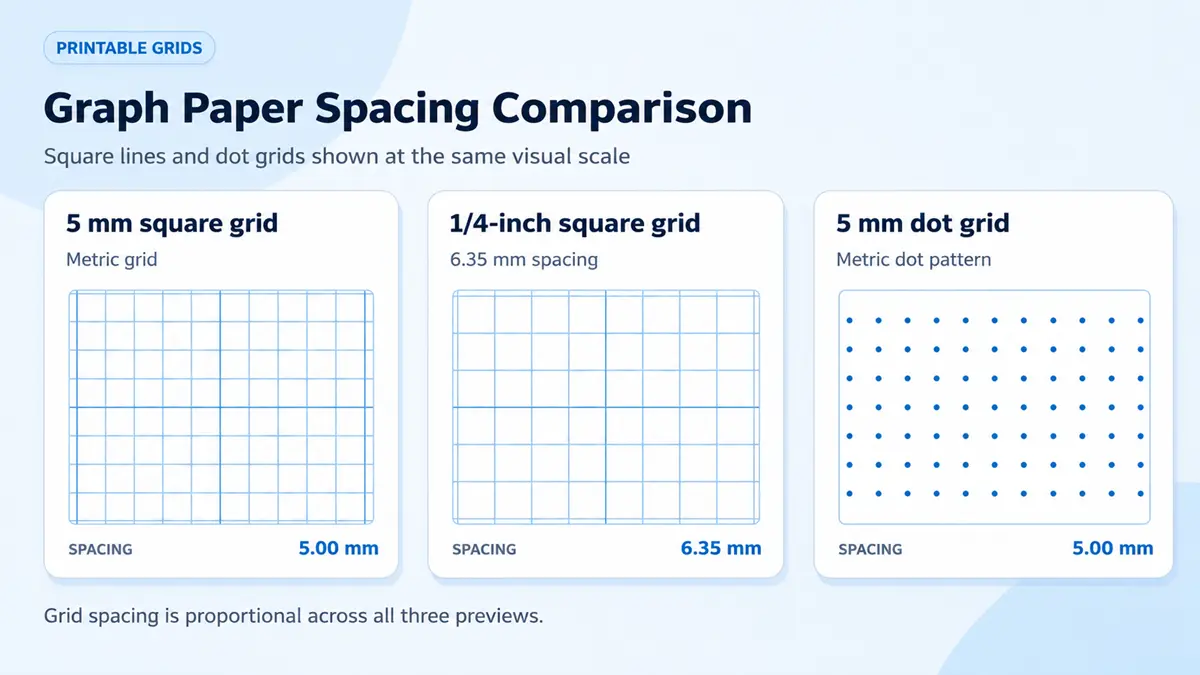
Square graph paper has evenly spaced horizontal and vertical lines. It's useful for plotting graphs, drawing diagrams, measuring distances, and keeping sketches aligned.
Dot grid paper uses small dots instead of continuous lines. The dots help you keep writing and drawings straight without filling the page with visible squares. It's a popular choice for bullet journals, planners, lettering, and freehand sketches. You can also make the dots smaller or larger to suit your preference.
Choose a square grid when you need clear lines for measurements or graphs. Choose a dot grid when you want a less noticeable guide for notes, layouts, or drawings. Both styles are available in the generator above.
You don't have to use a standard grid size. Choose Custom spacing to enter your own measurement in millimeters or inches.
You can change the grid color, choose a different paper background, and adjust the thickness of the lines or the size of the dots. For larger graphs, darker guide lines every five or ten squares can make the page easier to follow.
If you need several copies, select the number of pages before downloading. The tool can create up to 50 identical pages in one PDF.
US Letter is a common choice for home and school printing in the United States. A4 is widely used in many other countries, while A5 is useful for smaller notebooks and worksheets.
US Legal gives you a longer sheet for larger graphs. A3 offers more space for drawings and diagrams, while US Tabloid measures 11 × 17 inches and is another good option when a standard sheet feels too small.
Not every printer supports A3 or Tabloid paper, so check your printer's available paper sizes before printing.
Margins leave blank space around the graph so the lines don't run too close to the edge of the paper. The generator uses complete squares and centers the grid on the page, so the actual blank space may be slightly larger than the margin you selected.
Major grid lines are darker lines placed every five or ten squares. They can make larger graphs easier to read without changing the size of the squares.
For accurate printing: Download the PDF, select the matching paper size, and choose Actual Size or 100% in your printer settings. Avoid Fit to Page, which can change the printed grid spacing.
Very small grid spacing may not be available on larger paper sizes. If you see a message saying the grid is too dense, choose a larger spacing and try again.
Many printers have unprintable margins, so a grid set to zero margins may be cut off at the edges. Browser printing can also slightly round page dimensions. Use Download PDF when precise document dimensions matter. Actual printed measurements can vary with printer settings, so check a few printed squares with a ruler if you need an accurate scale.
Helpful answers
Download the PDF and choose the matching paper size in your printer settings. Select Actual Size or 100% instead of Fit to Page. If you need precise measurements, check a few printed squares with a ruler.
Select the 1/4-inch preset or choose 1/4 inch from the spacing menu. Each square measures 6.35mm on each side in the downloaded PDF. US Letter is a convenient choice for standard US printers.
A 5mm grid has two squares per centimeter, while a 10mm grid has one. Choose 5mm for smaller graphs and detailed work, or 10mm when you want larger squares.
Yes. Select Dot grid, choose your spacing, and adjust the dot size if needed. You can download the finished paper as a PDF for journaling, sketching, or planning.
You can choose US Letter, A4, A5, US Legal, A3, or US Tabloid. All six sizes support portrait and landscape layouts. Make sure your printer supports the paper size you select.
The tool uses complete squares and centers the finished grid on the page. If another full square won't fit, the remaining space is shared between the opposite margins.
Yes. You can create and download graph paper PDFs without signing up or adding a watermark. Your selected settings are processed in your browser.
Yes. Choose 1 inch from the Grid Spacing menu. Each square measures 25.4mm on each side in the downloaded PDF. Larger squares are useful for simple charts, drawings, and counting activities.
It means one inch is divided into ten equal squares. Each square measures 2.54mm across. Select 10 squares/inch from the spacing menu to create this type of graph paper.