PDF Compressor - A simpler way to shrink files
What this guide covers
- Compress PDF files online
- Reduce upload and email size
- Choose quality and DPI settings
- Use a browser-based privacy flow
Large PDFs can be frustrating when an email, form, or upload portal has a file size limit. A smaller PDF is often easier to send, store, and share.
The PDF Compressor tool helps reduce PDF file size directly in your browser, with simple controls for quality and resolution.
You do not need to sign up. In the normal browser-side flow, your PDF is processed on your device instead of being uploaded to a server.
That makes it useful for everyday documents, scanned files, and quick sharing tasks where you want a smaller file without extra setup.
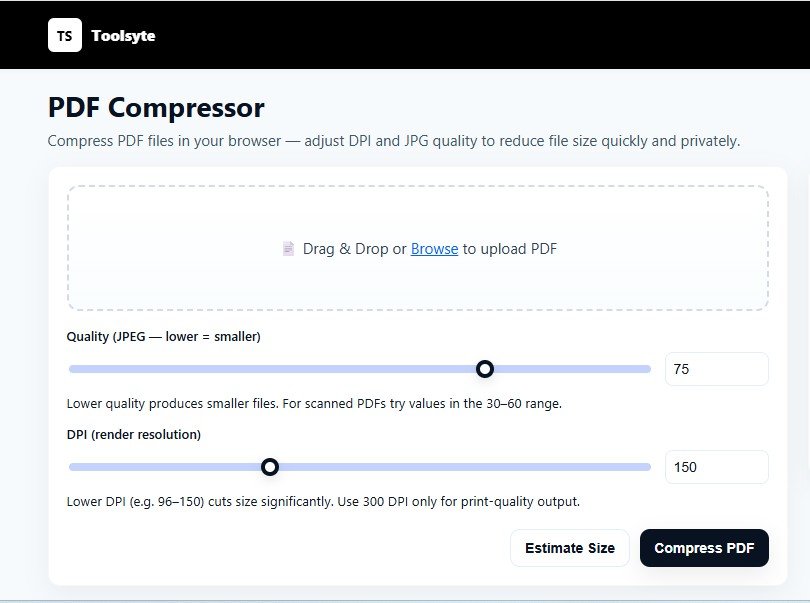
The tool keeps the steps simple: upload a PDF, adjust the settings, estimate the size, and download the compressed version.
As of now, the tool compresses files into non-searchable PDFs. It converts each page into an image and rebuilds a new PDF from those images.
If you need the text to stay searchable or copyable, use a different compression method that preserves the original text layer.
How the PDF Compressor works
The tool works by handling the PDF inside your browser:
- Each page is rendered after you choose the file.
- The result is compressed using your selected DPI and quality level.
- This approach works best for image-heavy or scanned PDFs.
What you can adjust
DPI and quality
Lower settings can make the file smaller. Higher settings can keep more detail. You can choose the balance that fits the document.
Size estimate
Use the Estimate Size option to preview the likely output size before creating the final file.
Private by default
Because the normal flow runs in your browser, your document can stay on your own device.
Clean interface
The page keeps the main controls visible and avoids unnecessary steps.
Free to use
The tool is completely free and requires no registration.
When to use it
- Compress PDFs for email attachments
- Reduce file size for online form uploads
- Make everyday documents easier to share
- Maintain privacy for sensitive or personal files
How to compress a PDF
- Upload the PDF you want to compress.
- Adjust the Quality and DPI resolution as required.
- Use the slider or input box to fine-tune the compression.
- Click Estimate Size to preview the output size.
- Click Compress PDF.
- Download the compressed PDF.
- Compress multiple PDFs one by one.
We will keep improving Toolsyte with tools that are useful, clear, and easy to open when you need them.
Thanks for using Toolsyte.
Ready to compress a PDF?
Open the Toolsyte PDF Compressor and reduce file size directly from your browser.
PDF Compressor FAQ
Can I compress PDF files online for free?
Yes. The Toolsyte PDF Compressor is free to open and helps reduce PDF file size online without extra setup.
Does the tool work best for every PDF?
It works especially well for scanned documents and image-heavy PDFs. Files that are mostly text may need a different compression method.
Will compressed PDFs stay searchable?
Not with the current image-based flow. The tool rebuilds pages as images, so selectable text may not remain searchable.